
If you are using an Edmi prepaid meter to measure and manage your energy usage, it is important that you know the Edmi prepaid meter codes to enable you to operate your meter seamlessly.
There are different codes that you can use to operate your Edmi prepaid meter from the comfort of your home, like ‘’10’’ & ‘’01’’ and ‘’91’’ for checking credit balance and meter number, respectively. These codes can only be used to perform a particular function in the meter. Not only that, the code for checking Edmi prepaid meter balance for single- and three-phase types is not the same. So, it makes sense for you to know your meter type and the suitable code for it.
However, if you don’t know the Edmi prepaid meter codes, let alone how to use them, no worries; you are in the right place; we’ll guide you in the subsequent sections. Keep a tab.
- Read also: Longi prepaid meter code
Edmi Prepaid Meter Codes List
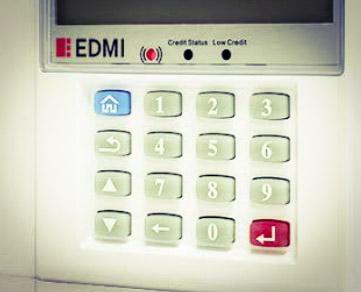
Edmi has different meter codes that can be used to perform a particular function. These codes are function-specific; hence, they can only be used to perform a particular function at a time. The table below summarises Edmi prepaid meter codes.
| S/N | Edmi prepaid meter codes (Single-Phase) | Edmi prepaid meter codes (Three -hases) | Function |
| 1. | 10 | 01 | Credit balance |
| 2. | 91 | 91 | Meter number |
From the table above, you can see that the code for checking meter balance for a single-phase Edmi meter is different from that for a three-phase meter. So, if you are using a single-phase Edmi meter, you should ensure that you choose the suitable code for it; the same thing is applicable if you are using the three-phase type.
- People are also reading: Conlog prepaid meter code
Code for Checking Edmi Prepaid Meter Balance
There are different codes that you can use to check your Edmi prepaid meter balance, depending on the type of meter that you are using.
For an Edmi single-phase meter, the code that you can use to check your meter balance is ‘’10’’. So, if you are using a single phase of an Edmi prepaid meter, you can use this code to check the remaining credit balance in your meter.
On the other hand, if you are using an Edmi three-phase meter to measure and manage your energy usage, the code that you can use to check your credit unit balance is ‘’01’’. This means that if you are using a three-phase Edmi prepaid meter, you can use this code to check your credit balance.
Code for Checking Edmi Prepaid Meter Number
To check your Edmi prepaid meter number, the code that you can use is “91”. So if you don’t know your Edmi prepaid meter number, you should enter this code into your meter’s CIU and click on the enter button and you’ll be able to see your prepaid meter number on the display screen.
How to Check EDMI Prepaid Meter Balance
Now that you know the different codes that you can use to check your Edmi prepaid meter balance, both for single-phase and three-phase types, let’s look at how you can use the code to check the remaining credit balance on your meter.
- Locate your EDMI prepaid meter CIU or keypad
- Plug the CIU to a reliable power source
- Choose the code that is suitable for your meter type, i.e., ‘’10’’ and ‘’01’’ for single- and three-phase Edmi prepaid meter types, respectively
- Input the code in the CIU
- After entering the code, click on the ‘’Enter’’ button
- And guess what? Your remaining Edmi prepaid meter balance will display on your CIU screen.
Conclusion
There are different codes that you can use to operate your Edmi prepaid meter, such as ‘’10’’ & ‘’01’’ and ‘’91’’ for checking credit balance and meter number, respectively. However, don’t forget that the codes that you can use to check credit balance on single- and three-phase Edmi meters are not the same, so you should ensure that you choose the appropriate code for your meter type to enable you to get the best result.