
Genus prepaid meters are used in managing electricity usage. But before you can use it, you are required to load prepaid credit unit into it, and to keep your meter functional, you must have enough credit units, and this is where checking Genus prepaid meter balance comes in.
Checking Genus prepaid meter balance is not difficult, and there are different ways that you can use to do that, such as online, using a code, mobile app, etc. These methods are effective and easy to use too.
Genus Prepaid Meter Balance Check
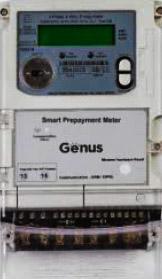
As said earlier, there are different methods that you can use to check Genus meter balance. There are both online and offline methods that you can use to do that. We’re going to shed more light on them in subsequent subsections.
Genus Prepaid Meter Balance Check Online
This is one of the ways that you can use to check your Genus prepaid meter balance. It is easy and simple. Follow the simple steps below to check it using this method.
- Go to the official website of your electricity distribution company
- Log in to the site your details
- Locate the ‘’Balance’’ sections within the website and click on them. You will be able to see your remaining meter balance.
Genus Prepaid Meter Balance Check Code
You can also check your Genus prepaid meter balance using a code. The possible codes that you can use to do that are 07, 000, or 01. The code is not specific because it varies depending on the model of Genus prepaid meter you are using. To check your Genus prepaid meter balance using code, do this:
- Locate your meter’s CIU
- Plug it into suitable power source
- Input the code that corresponds to your own meter model: 000, 01, 07.
- After putting the code, click on the ‘’Enter’’ button, and your balance will display in your CIU.
Genus Prepaid Meter Balance Check App
This is another simple method that you can use to check your Genus prepaid meter balance. It is simple to navigate, so long as you know your electricity provider’s mobile app. Kindly follow the steps below to check your meter balance using this method
- Go to the official app store and download the Genus app, if you don’t have one.
- Create an account using your details
- Sign in to app and locate the “Balance’’ section within it
- Once you see it, click on it, and your meter balance will display.
Genus Prepaid Meter Balance Check Number
The last method on our list that you can use to check your Genus prepaid meter balance is by contacting your electricity and requesting a balance check. However, there are general contact details that you can use to reach out to electricity providers since different regions have unique providers. However, if you don’t have your provider’s number, you can call this number: +91 141 7102400 / 500, if it is available in your region, and ask them to help you check your Genus prepaid meter balance.
Conclusion
There are different simple methods that you can use to check Genus prepaid meter balance, like online, app, code, or by contacting your electricity provider. These methods are quite simple to use. So, you can check your Genus prepaid meter balance using any of these methods, and you’ll be able to see your remaining credit units.