
When using your prepaid meter, it may malfunction, and you can get it fixed by resetting it. There are different methods that you can use to reset your prepaid meter in Nigeria, but in this article, we are only going to discuss how to use a code to reset it.
Under the Jos Electricity Distribution (JED) company, there are different prepaid meter brands that electricity consumers use to manage their energy usage. And each meter brand usually has unique codes that you can use to operate it. This means that the code that you can use to reset your meter differs depending on the meter brand that you are using.
However, irrespective of the JED prepaid meter brand that you are using, we are going to show you how to use a more common code to reset your meter.
Jed Prepaid Meter Reset Code
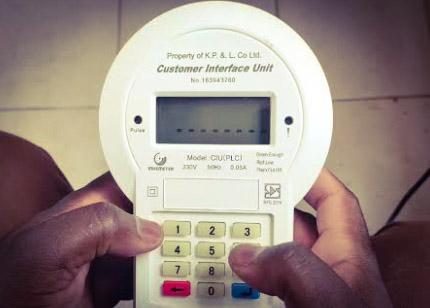
The primary code that you can use to reset your JED prepaid meter is 990. There are two different methods that you can follow to reset your meter using this particular code.
First Method
- Find your JED prepaid meter CIU and plug it into the socket.
- Press ‘’990’’ on the keypad and tap on the ‘’ENTER’’ button
- After that, input ‘’8888’’ on the same CIU and still click ‘’ENTER’’ tab again
- Now, press ‘’999’’ on the keypad again and punch the ‘’ENTER’’ button.
- If you got these steps correct, your CIU screen will display ‘’RESET,’’ and your meter is ready for use.
Second Method
- Connect your meter’s CIU to electricity source
- Input ‘’990’’ into the meter through the CIU and click on enter
- Next, key in ‘’0000’’ on the keypad and tap enter
- At this point, punch ‘’999’’ on the meter’s CIU again and still tap on the enter tab.
- Finally, your meter’s screen will display ‘’RESET,’’ which shows that it has successfully been reset and you can use it.
N/B:
This method may not work for all the different meter brands under JED, but it will work for most of the meters, especially the Memmcol meter brand. But you can still try this code irrespective of your meter brand to see if it can work for you.
JED Prepaid Meter Reset Code not Working
If you tried resetting your JED prepaid meter using a code but it is not working, you should ensure that your meter battery is good, that the meter is properly paired, and that it is properly connected to the meter socket. However, if you have done all these and it is still not working, you can contact a JED Electricity provider customer care representative and ask them to help you reset your meter.
Conclusion
The code that you can use to reset your JED prepaid meter is ‘990.’ You can use this code to reset Memmcol prepaid meters and other brands. If you follow the two different steps outlined in this article, you are going to reset your meter with this code without having any issues. And your meter will be ready for use.