
Prepaid meter codes are a unique set of numbers or a combination of numbers and special characters that are used to operate prepaid meters. When you talk of PHED prepaid meter codes, it means a unique number or special characters with numbers that are used to operate and manage PHED prepaid meters.
There are different PHED prepaid meter codes that are used to operate the meter. However, it is pertinent to note that PHED doesn’t have particular meter brands; rather, they give out different brands to their customers, like Conlog meter, Mojec meter, Longi meter, etc. Since PHED doesn’t have a general or uniform prepaid meter, their codes vary depending on the prepaid meter brand that a customer is using.
So, if you have Conlog prepaid meter brand in Port Harcourt, the code you will use to operate your prepaid meter, like checking of meter meter, credit balance, etc., will be different from another electricity consumer who uses Mojec prepaid meter brand in the same Port Harcourt. For you to properly use the PHED prepaid meter codes to operate your meter, you should know the brand of the prepaid meter you are using and the code that aligns with functions you want to carry out.
For further information about the PHED prepaid meter codes, their functions, and how to use them effectively, kindly go through the subsequent sections of this article.
PHED Prepaid Meter Codes in Nigeria
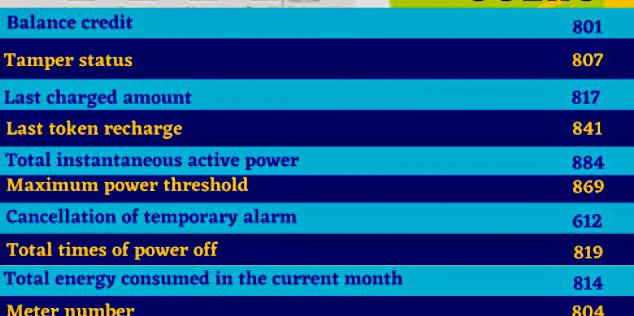
There are many PHED prepaid meter codes that are used to perform different kinds of functions like checking credit balance, meter number, activating the meter, etc. However, these codes vary depending on the brand of the meter that you are using. Each meter brand that PHED gives out to their customers has its own unique functional codes. The table below summarizes PHED prepaid meter codes with their functions attached.
| S/N | Function | Longi Meter Brand | Memmcol Meter Brand | Conlog MeterBrand | Skyrun MeterBrand | Mojec MeterBrand |
| 1. | Meter Balance | 801 | 07 | 009 | 009 | 009 |
| 2. | Meter activation | 620 | – | #43# | – | – |
| 3. | Credit amount | 817 | – | 077 | 040 | 040 |
| 4. | Meter reset | # | 990 | – | – | 990 |
| 5. | Turning off alarm | 613 | – | 812 | 045 | 045 |
| 6. | Meter number | 804 | 65 | #100# | 100 | 100 |
How to Use PHED Prepaid Meter Code
Using a PHED prepaid meter code is not difficult since it only involves simple procedures. To operate your PHED prepaid meter using the code, do this:
- Connect your meter’s keypad (CIU) to the power source
- Choose the code from the above section that corresponds with the function you want to perform and input it into the meter.
- Once you are done putting the code, click on the ‘’Enter’’ tab
- And guess what? The result for the function that you performed will display on the screen.
PHED Prepaid Meter Activation Code
The PHED prepaid meter activation code is not fixed; it varies based on the meter brand. However, if you are using Longi prepaid meter brand or Conlog meter brand, you can activate them using 620 and #43#, respectively. Once you input the code into your meter, your meter will be activated automatically.
Conclusion
Understanding and using the correct PHED prepaid meter codes for your specific meter brand can help you manage your energy consumption more efficiently. Since PHED distributes different meter brands with unique codes, it’s important for you to know these codes that are relevant to your meter type, be it Longi, Mojec, Conlog, Skyrun, or Memmcol. By knowing these codes, you’ll easily be able to check your balance, activate your meter, and perform other essential functions.
Don’t forget to take some time to refer back to the provided code table and instructions in this article whenever you need assistance, and don’t hesitate to reach out to PHED customer support if you encounter any issues.
Hello Moses James I woke up this morning to punch in my token on the keyboard to my meter only to discover, no button on the keyboard is functioning. That is I can’t add units to my meter hence keeping my family without light supply. What do I do? Or which code do I use?