
When your Hexing prepaid meter is not connecting, it means that it won’t supply light to your property. If your meter stops supplying power, you’ll be left in total darkness, thereby disrupting your activities, especially if you depend on electricity to perform some tasks.
To avoid being frustrated when your Hexing prepaid meter is not connecting, you should know what can cause it at first and then look for solutions on how to get it fixed. And that brings us to today’s discussion, which is on hexing prepaid meters not connecting.
There are different reasons that can cause your Hexing prepaid meter not to connect, like configuration problems, communication errors, software problems, etc. However, you can fix these issues by pairing your meter’s CIU to the meter and restarting the meter, among others.
Read also: How to reset prepaid meter
What Does It Mean When Your Hexing Prepaid Meter Is Not Connecting?
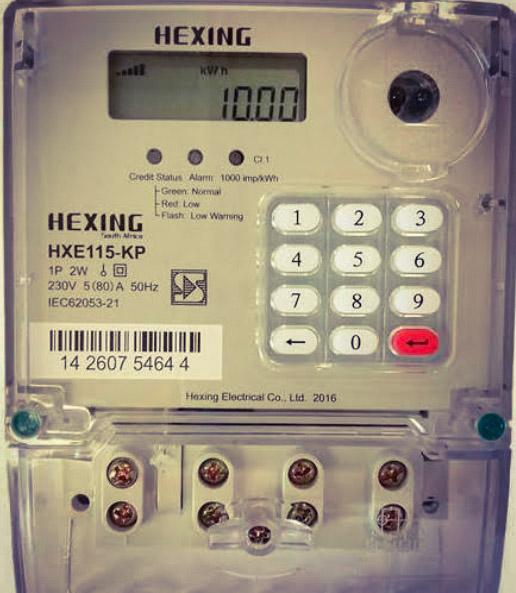
When your Hexing prepaid meter is not connecting, it means that there is a problem with the meter somewhere. However, this doesn’t mean that it can’t be fixed. Once your Hexing prepaid meter is not connecting to the power supply, the first thing that you should do is to find out what caused it. After finding out the primary cause, you will then look for how to fix it. For you to understand it better, let’s look at the reasons why your meter is not connecting, and afterward, we’ll show you how to fix it.
What Makes Hexing Prepaid Meter Not to Connect?
There are many reasons that can cause your hexing prepaid meter not to connect to the power supply. Some of these causes may be minor issues, while others may be complex problems. Nevertheless, we are going to list the causes right away.
1. Communication Problem between the Hexing Prepaid Meter and Power Provider
If your Hexing prepaid meter is not connecting properly to your electricity provider due to poor network coverage, it will not be able to connect to the power source. And once your meter is struggling to connect to the power supply, it won’t be supplying light, thereby forcing you to stay in darkness even when there is electricity within your neighborhood.
2. Hexing Prepaid Meter Configuration Error
When your Hexing prepaid meter is configured wrongly, it will not be able to connect to the power supply. This normally occurs if the meter is wrongly configured after installation.
3. Hexing Prepaid Meter Damage
This is another common issue that can cause your Hexing prepaid meter not to connect to a power source. If your meter is damaged, it will become faulty, and some of its components won’t be able to function optimally again, making it difficult for it to connect to a power source.
4. Hexing Prepaid Meter Software Probem
Another common problem that can cause your Hexing prepaid meter not to connect is outdated or faulty software. This prepaid meter has software like other electronic devices, so when it becomes old or gets spiled, the meter won’t be able to connect to the power supply again.
5. Hexing Prepaid Meter Token Problems
If the prepaid token that you loaded to your hexing prepaid meter is expired, wrongly generated, or you loaded it incorrectly, it won’t be able to connect to a power source, especially when you’ve exhausted your credit unit.
Solutions to Hexing Prepaid Meter Not Connecting
In the section above, we mentioned some of the possible reasons why your Hexing prepaid meter may fail to connect to a power source. Let’s now see how we can solve the problem. There are different simple measures that you can take to solve issues of your Hexing prepaid meter not connecting. Some of the measures are discussed below:
1. Plug your Hexing Prepaid Meter Customer Interface Unit to Another Socket
The first step that you should take when your Hexing prepaid meter is not connecting is to unplug your meter’s CIU from the current power outlet and replug it to another reliable power source.
When you want to plug it into another power source, you should look for one that is a bit closer to the main meter outside the property. Ensure that the socket is not faulty. Once you plug, you can then try loading your prepaid token, and this time, it may likely work, especially if the issue was due to a communication issue between the meter and the CIU.
2. Link your prepaid meter with the User Interface Unit
This is another method that you can use to get the issue of prepaid meters not connecting fixed. In this method, you will need to manually pair the CIU with the Hexing prepaid meter by using some codes. This code is essential if you suspect that the meter’s CIU is not properly linked to the meter itself. There are two different ways that you can do that. Viz:
First Method:
- Connect your meter’s CIU into a socket
- Press your meter number on it and tap on the ‘’Enter’’ button
- At this point, you will need to put ‘’809’’ and then press the ‘’Enter’’ tab
- If you follow these steps correctly, your CIU screen will show 0.1, and you can now load the prepaid token again.
Second Method:
- Plug your Hexing prepaid meter CIU to power source
- Click on ‘’2’’ to get started.
- Now, put this code ‘’18075773902’’ on the CIU and tap Enter
- After entering it, you will see a success message in your screen
- Next, your meter CIU screen will also display another ‘’SUCCESS’’ message, which means that it has been paired successfully.
- And guess what? Your meter is ready for use.
3. Restart your Hexing Prepaid Meter
You can also resolve the issue of your meter not connecting by restarting it. This method works perfectly if it is a minor issue. You can restart your meter by turning off the main switch of your prepaid meter, waiting for a few minutes and then switching it on again. Alternatively, you can contact a certified electrician and they will help you to fix it.
4. Check the Power Supply and electricity Network within your Region
You should as well check the electricity supply and network coverage in your area. Somedays, there may be low or high voltage or even a poor network, which may cause your meter not to connect to a power source. So, you should confirm with other electricity users within your neighborhood if they have suitable power supplies. If they don’t, then you should know that it is a general problem and it won’t last for long.
5. Hexing meter customer service
The last method on our list that you can use to fix the issue of the hexing prepaid meter not connecting is to contact their customer support unit. However, Hexing doesn’t have a general phone number or contact support for all the electricity consumers who use their meter brand. Since there are different countries of the world that use Hexing prepaid meters, it is best for you to contact your electricity provider in your area and explain to them what you are passing through with your meter and the measures you have taken to get it resolved. They are going to help you get it fixed.
Conclusion
Although there are many things that can cause your Hexing prepaid meter not to connect, they can be fixed. So, if your prepaid meter is having connection issues, you should resolve it by connecting the CIU to the meter using code, restarting the meter, or reaching out to your electricity provider when the issues persist.